Twitter & My 5-Year Anniversary

I joined Twitter July 2009.  5 years later…I’m more active on my account than I’ve ever been.  I began as a follower, became a curator and now also a content creator through my blog posts.

Twitter has granted me ease of access to information across a range of topics, allowed me to create real offline connections that I would not have otherwise been able to make, given me a voice and power of influence with the CEO’s, politicians and educators of this world, and created a new habit for me.

#onlinefirst

With only 140 characters, we are able to stay current with the news, learn something new, engage with our immediate and the global community and express ourselves. Twitter has removed the need for search and given us constant access to knowledge; search now happens after. And having this channel of real-time information has provided us with transparency about industries, corporations and governments. We are more informed and educated than we’ve ever been because of twitter, and this has inspired individuals to challenge long-established systems and advocate change to remove constraints to our freedom, such as we’ve seen recently with Turkey and during the Arab Spring, and also with Student Voice – twitter chats that enable students to be heard and influence decisions around education.

#transparency

Twitter has also allowed me to connect with individuals in a new way and so much of my network today has originated from twitter. There once was a time when online connections were considered ingenuine, such as when people distinguished between “Facebook friends” and real friends. But on Twitter, conversations initiate relationships; followers are less predetermined by existing relationships and driven by content, not by professional statuses or pictures that typically create exclusivity or immediate filtering.

#relationships

Twitter has touched upon every area of my life, from social to education to professional, and has changed how I explore and connect within these areas. I have yet to see another web and mobile service that is able to provide such speed and penetration of information and enable its users to create impact at a global level.

twitter-icon

Follow Me on Twitter @tiffanydstone

So you think you can design

The ease of starting an online business or creating a mobile app has empowered individuals around the world to become entrepreneurs.  As a result, there are A Lot of internet startups and new apps, and more continue to emerge every day.  But what we are seeing from the ones that survive are not just a unique idea or business model, convenience of service, better and sustainable margins, but also innovative design that creates an enjoyable and engaging experience for the user.

Great ideas must be communicated through great design.

With increasing emphasis on design today (and really everyday!), I think it’s important to revisit the design framework laid out by Dieter Rams.

What is “Good Design”

  1. Innovative
  2. Makes a Product Useful
  3. Aesthetic
  4. Makes a Product Understandable
  5. Unobtrusive
  6. Honest
  7. Long-Lasting
  8. Thorough Down to the Last Detail
  9. Environmentally Friendly
  10. As Little Design as Possible


In my recent Never Enough Time post, I discuss the importance of design and review features for calendar systems and apps.  I’ve also discussed the importance of design and the qualities of good design in past posts such as Shop A Swag.

Show Me the Money

Created by Tiffany Stone

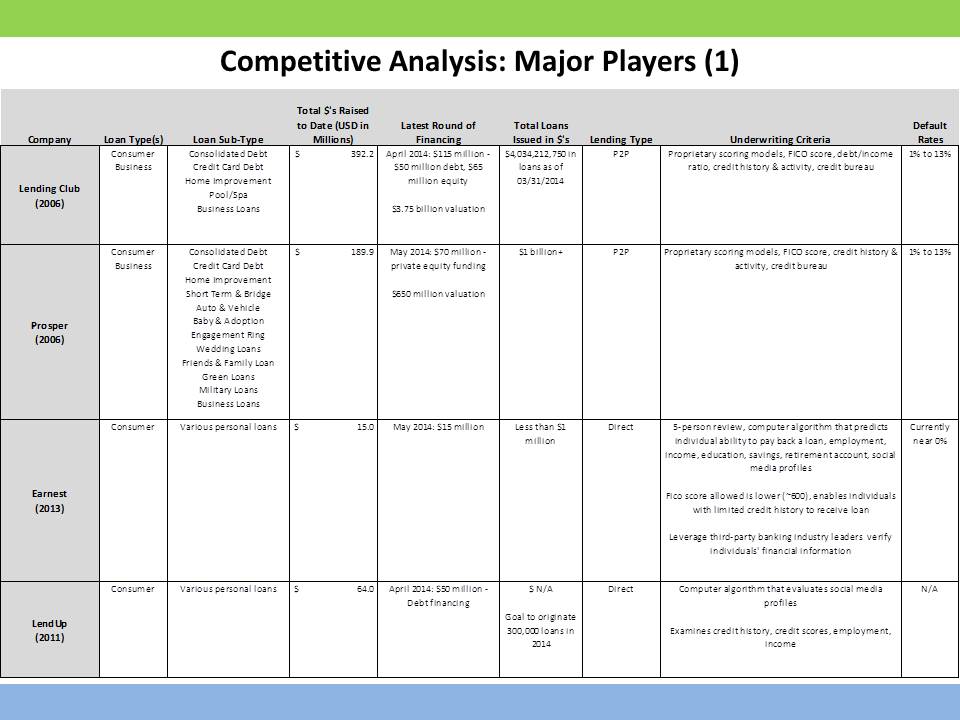
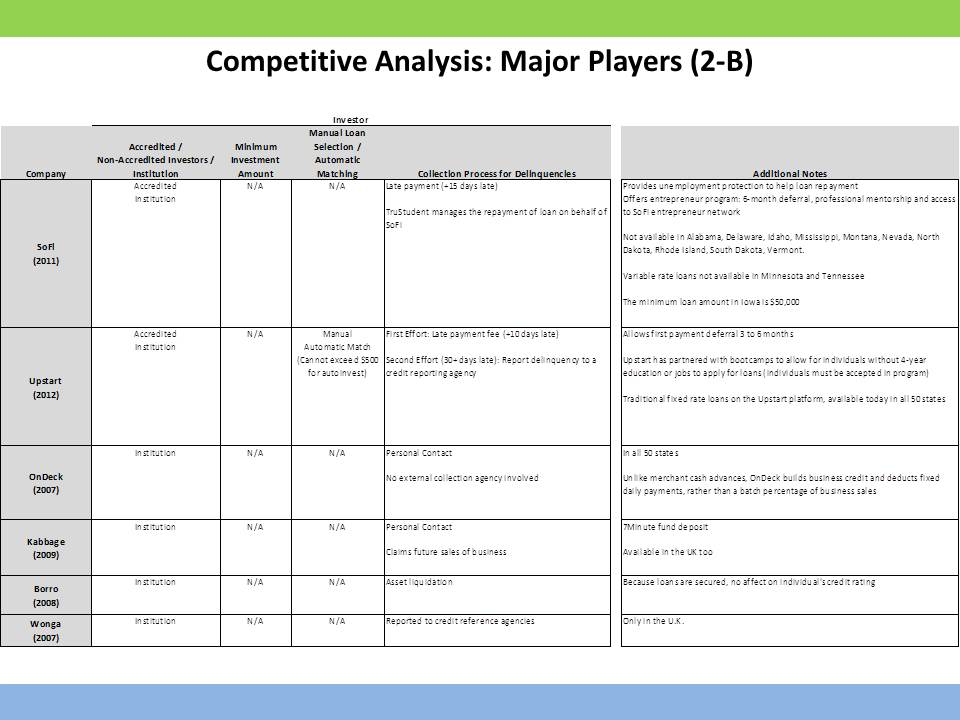
Alternative lending involves various types of loans available to consumers and business owners outside of a traditional bank loan.  Alternative lending includes crowdfunding (rewards and equity-based), peer-to-peer lending (interest-based, asset-based, consumer, small business) and other non-bank financial firms.

I’ve shared below my comparison of a few major online alternative lenders, including Lending Club, Prosper, Earnest, LendUp, Sofi, Upstart, OnDeck, Kabbage, Borro and Wonga.

Alternative Lending Comparison Slide 1 - Tiffany Stone Alternative Lending Comparison Slide 2 - Tiffany Stone Alternative Lending Comparison Slide 3 - Tiffany Stone Alternative Lending Comparison Slide 4 - Tiffany Stone Alternative Lending Comparison Slide 5 - Tiffany Stone Alternative Lending Comparison Slide 6 - Tiffany Stone

DevOps Market Map

I’ve put together a basic DevOps Market Map.  Check it out, would love suggestions/feedback!

What is DevOps?

Development + Operations

DevOps is a software development method that aims to increase communication, collaboration and integration between software developers and IT operations through automation of the change, configuration and release processes, an extension of Agile Development – releasing updates to product early and often (“perpetual beta”).

* DevOps requires not only the appropriate tools but also a change in organization and culture.

DevOps Lifecycle:

  1. Check in code
  2. Pull code changes for build
  3. Run tests (Continuous Integration server to generate builds & arrange releases): Unit tests, integration test, user acceptance test
  4. Store artifacts and build repository (repository for storing artifacts, results & releases)
  5. Deploy and release (release automation product to deploy apps)
  6. Configure environment
  7. Update databases
  8. Update apps
  9. Push to users – who receive tested app updates frequently and without interruption
  10. Application & Network Performance Monitoring (preventive safeguard)
  11. Do it Again!
DevOps Market Map by Tiffany Stone

Never Enough Time

Currently, I see many calendars and apps that are either focused on one aspect of the calendar (e.g. iCal and Sunrise for calendar integration and Doodle and Flock for scheduling) or a certain individual (e.g. Tempo for networkers).  And other calendars, that aim to be multi-purpose, offer too many features that in theory would tremendously enhance the planning experience but realistically do not align with user behavior (e.g. To-Do recommendations based on location).  Where I believe many calendars fail is their lack of simplification and integration of their features to reduce mental energy and user action.  The challenge is also to maintain functionality and avoid a foreign UX that risks engagement.

I think Magneto has impressive core features that are addressing some of the missing tools and scheduling experiences on many other calendar apps.  These features are focused on simplifying key issues with scheduling and task / event creation.  While the purpose of these features is nothing new, the features themselves provide enhanced solutions to old problems.  For example, the browser add-on significantly reduces the manual inputs involved in adding an event or task to your calendar by extracting information from your current webpage or email regarding an event or meeting and adding it to your calendar (below is a snapshot).  The created event can be shared across your personal and professional calendars through Magneto.  Magneto’s browser add-on automates date, time, participants and location input entries.  In comparison, Gmail calendar is limited to adding events from Gmail to only the Gmail calendar and requires exporting events onto its calendar from all other sites such as Facebook.

What I like most about Magneto is their attempt to resolve meeting scheduling by providing the capability to  schedule meetings without numerous email exchanges and view availability on both my personal and work calendars while scheduling.  However, this is also the feature I struggled most to understand and use.  Sharing my calendar via an email invite was simple but the time-proposing and event scheduling process that followed was confusing.  The experience was not as intuitive as I would have liked it to be (another calendar problem: functional but hard to use).  Those on the receiving end of my scheduling invite also had some difficulties navigating the tools.  I think improved guidance during the time-selection process between individuals is the missing piece, suggesting that there is too much unnatural form of input and needs to be a more intuitive user interface.

Overall, I think Magneto has differentiated itself as a strong calendar system with its features but I think it still falls short of replacing individuals’ primary use of Gmail, Outlook and other Calendars because while its features are useful and address the main issues with calendar management and scheduling, they are difficult to learn to use.